

The Approvals interface
The Approvals interface is the same for both parties: it shows every request sent or received, with the complete history of the steps, so the process can be traced end to end.
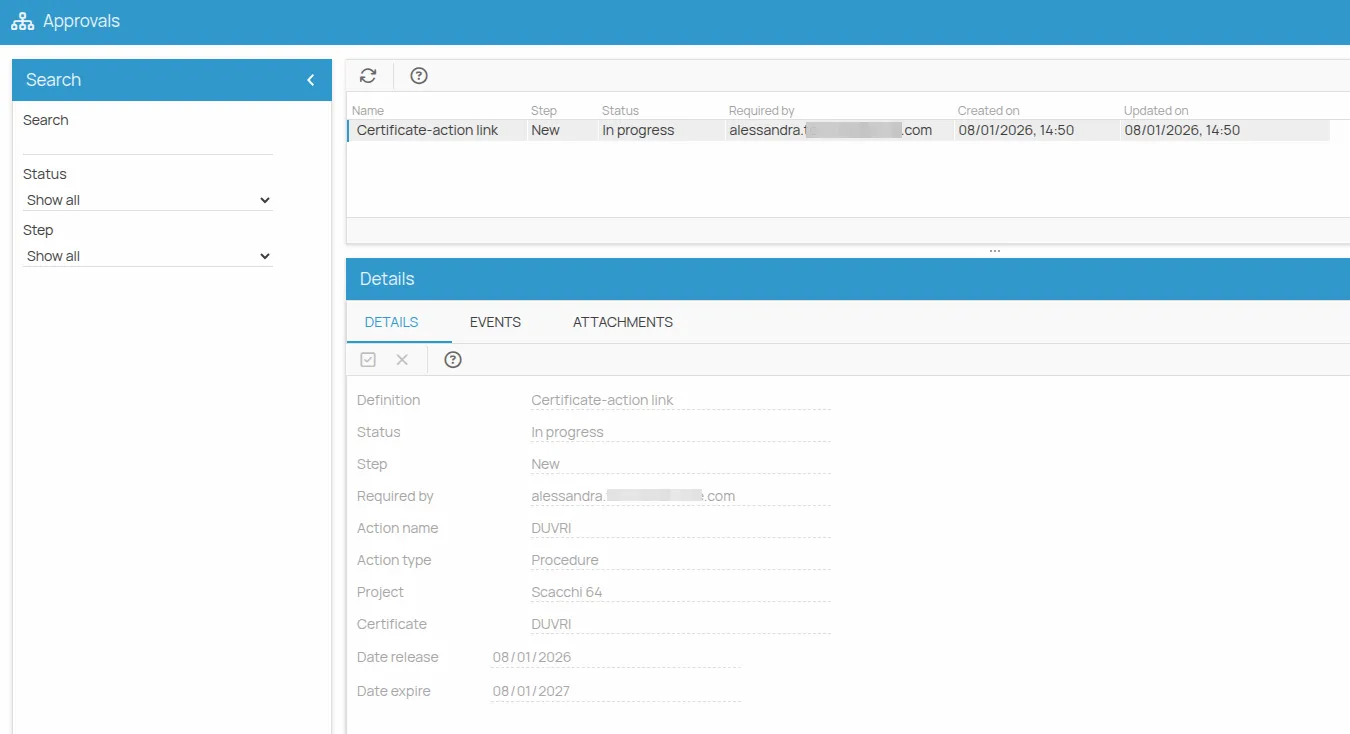
Step and status
Section titled “Step and status”The two are not the same thing, and the filters treat them separately:
- the step is a single action within the process;
- the status is the overall condition of the request.
| Values | |
|---|---|
| Step | New · Approved · Rejected |
| Status | In progress · Completed |
When a request is created, the step is “Creation” and the status “In progress”. At the end — after an approval, for example — the row shows step “Approved” and status “Completed”.
Search filters
Section titled “Search filters”| Filter | What it does |
|---|---|
| Text search | free text |
| Status | filters on the overall process status |
| Step | filters on the individual phase |
The detail tabs
Section titled “The detail tabs”Clicking a row opens the details:
| Tab | Contents |
|---|---|
| Details | the specific information of the approval |
| Events | every step carried out: who did it, the type of step, the date and any notes |
| Attachments | the files attached to the approval, such as the certificate submitted for validation |
The columns of the list
Section titled “The columns of the list”| Column | Description |
|---|---|
| Name | generally “Approval” plus the name of the action |
| Step | New, Approved or Rejected |
| Status | In progress or Completed |
| Requested by | email of the user who performed the step |
| Dates | creation and modification dates of the step |
A complete cycle
Section titled “A complete cycle”- The supplier creates the request: a step with status New is generated and the request is In progress.
- The project manager approves it: a new step Approved is generated and the request becomes Completed.
If the request is rejected, a step with status Rejected is generated instead, and the supplier has to submit a new one.
This site is protected by reCAPTCHA and the Google Privacy Policy and Terms of Service apply.