

Create a multi-company project
Creating projects from the panel is reserved to users with the Admin role. A Manager can operate on all existing projects but cannot create new ones — see Multi-company groups.
- Open the multi-company panel from the Start menu.
- Create the new project from the panel.
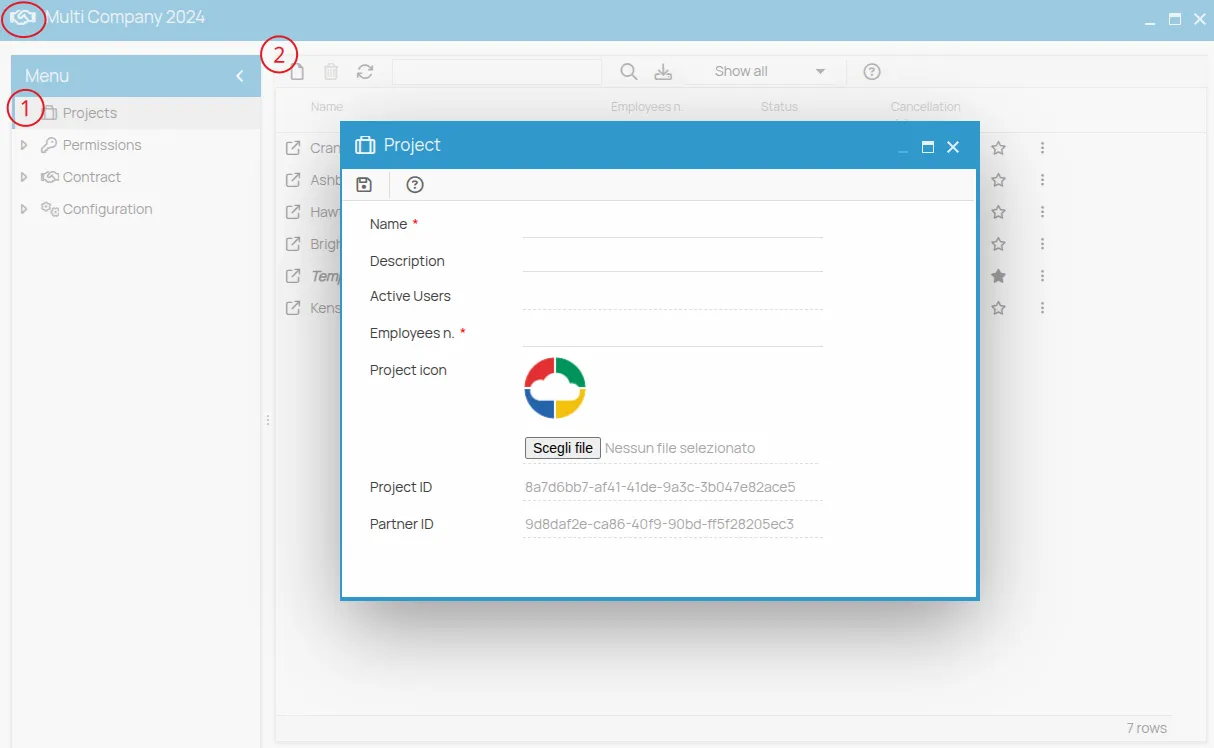
The project is created already linked to the multi-company plan, and the users enabled on the panel reach it without any further assignment.
If there is no administrator yet
Section titled “If there is no administrator yet”To enable further users as Admin there must already be at least one administrator in the panel. If the first Admin is missing, or the panel has not been activated, contact technical support.
The template project
Section titled “The template project”Multi-company projects also include a template project: a model with pre-filled data. Users assigned to the linked projects can access its contents and create their own elements by copying from it — see Copy an element.
This site is protected by reCAPTCHA and the Google Privacy Policy and Terms of Service apply.