

Forms
A form turns an activity into structured data: a checklist to tick, an attendance register to sign, a set of fields to fill in while the work is being done.
Forms exist to make data collection uniform. Without them, what happened during an activity survives as a note or an attached photo; with them, the same activity produces comparable records over time, filled in on the spot — including from a phone — and attached automatically to the document that proves compliance.
Two phases that must not be confused
Section titled “Two phases that must not be confused”- Configuration defines the structure: which fields, which questions, which rules. It is done once, on the action.
- Completion enters the data during the activity. Every save produces a static document linked to what was done.
Everything in this area follows this split. You configure on the action; you fill in on the session or when issuing the certificate.
Where a form appears
Section titled “Where a form appears”Forms are part of the workflow: you never go looking for them in a separate archive, the system prompts them when they are due. There are two moments:
- from the session toolbar — the case of the course attendance register, filled in while the session is running;
- when issuing a certificate — for all other types, the form opens before the certificate is finalised, and the data collected becomes an attachment to it.
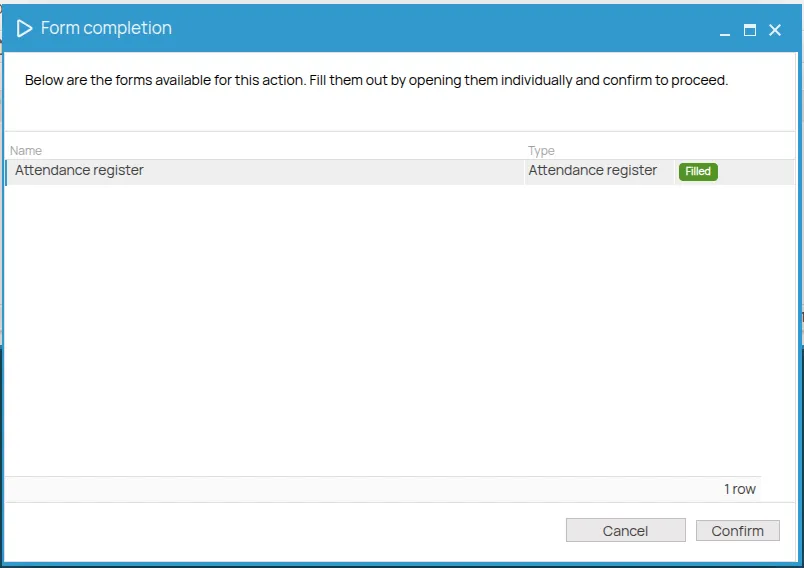
A form can be marked required: in that case the certificate cannot be created until the form has been completed. This is the mechanism behind the permit to work.
Forms and widgets
Section titled “Forms and widgets”4HSE has a second way to build something to fill in: the widget. It is the same editor — choosing an advanced checklist on a form opens the 4HSE Designer, which is the widget editor — but the two differ in where they live and what they produce.
| Form | Widget | |
|---|---|---|
| Lives | attached to an action | as a file in the archive |
| Starts | when the system prompts it | when you open it |
| Produces | an attachment to the certificate | a file you save where you want |
Use a form when what you collect is the evidence of an obligation. Use a widget when you need something to fill in that does not belong to an action — an inspection sheet, a survey, a report form.
This site is protected by reCAPTCHA and the Google Privacy Policy and Terms of Service apply.