

Your account
Your account is the identity you log in with. It is identified by an email address, which is both your username and the address every notification reaches — see Users and people for how an account relates to the person registered in a project.
This area covers what belongs to you rather than to the projects you work in.
Two different things
Section titled “Two different things”- The account — your email, your password, your two-factor authentication, your interface language. It is managed in a dedicated panel, and it follows you across every project you belong to.
- The preferences — how 4HSE looks and behaves for you: which screen opens at startup, where the details panel appears, how often the digest reaches you.
The account panel
Section titled “The account panel”You reach it by clicking your email address in the user menu, at the bottom right of the main 4HSE interface.
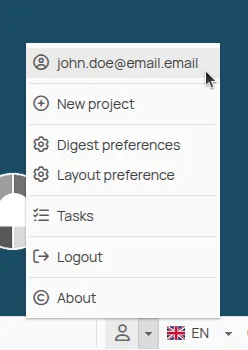
From there you can update your personal details, change your password and turn on two-factor authentication.
The preferences
Section titled “The preferences”They are personal and do not affect anyone else: the start screen, the layout and the digest. You reach them from User preferences in the same user menu.
This site is protected by reCAPTCHA and the Google Privacy Policy and Terms of Service apply.